



Honda Pilot: Features
Honda Pilot 2023-2026 (YG1/YG2) Owners Manual / Quick Reference Guide / Features
Audio Remote Controls
Models with 7-in. Color Touchscreen
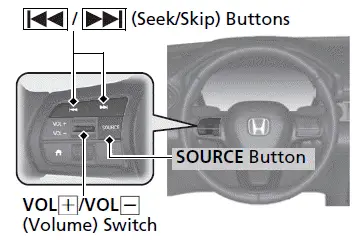
- SOURCE Button
Press to cycle through the audio modes as follows:
FM AM
AM
 USB/iPod/Apple
CarPlay/
Android Auto
USB/iPod/Apple
CarPlay/
Android Auto
 Bluetooth Audio
 - VOL(+) / VOL(-) (Volume) Switch Press to adjust the volume up/down.
-
 (Seek/Skip) Buttons
Radio:
Press to change the preset
radio station. Press and hold
to change the preset
radio station. Press and hold
 to change the strong station.
iPod, USB flash drive, Bluetooth Audio, or Smartphone Connection:
Press to skip to the
beginning of the next song or return to
the beginning of the current song.
to skip to the
beginning of the next song or return to
the beginning of the current song.USB flash drive or Bluetooth Audio: Press and hold
 to change a
folder/group.
to change a
folder/group.
Models with 9-in. Color Touchscreen
Models with A-type meter
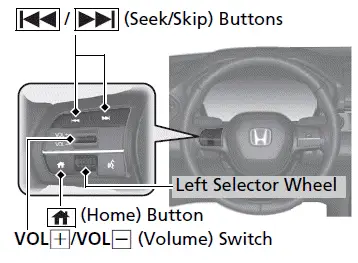
Models with B-type meter
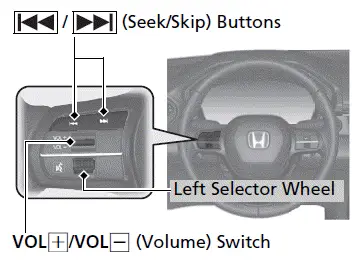
- VOL(+) / VOL(-) (Volume) Switch Press to adjust the volume up/down.
-
 (Seek/Skip) Buttons
Radio:
Press to change the preset
radio station. Press and hold
to change the preset
radio station. Press and hold
 to change the strong station.
iPod, USB flash drive, Bluetooth Audio, or Smartphone Connection:
Press to skip to the
beginning of the next song or return to
the beginning of the current song.
to skip to the
beginning of the next song or return to
the beginning of the current song.USB flash drive:
Press and hold to change a
folder.
to change a
folder.
Models with A-type meter
- Left Selector Wheel
When selecting the audio mode
Press the (Home) button, then
roll up
or down to select Audio on the driver
information interface, and then press the
left selector wheel.
(Home) button, then
roll up
or down to select Audio on the driver
information interface, and then press the
left selector wheel.
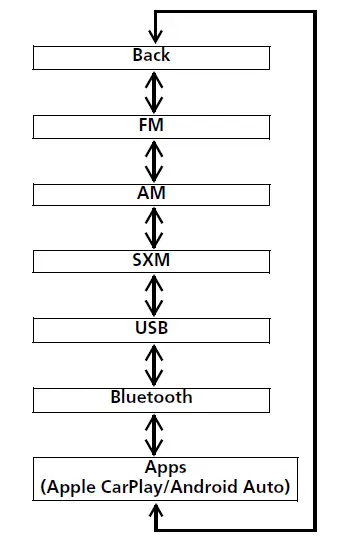
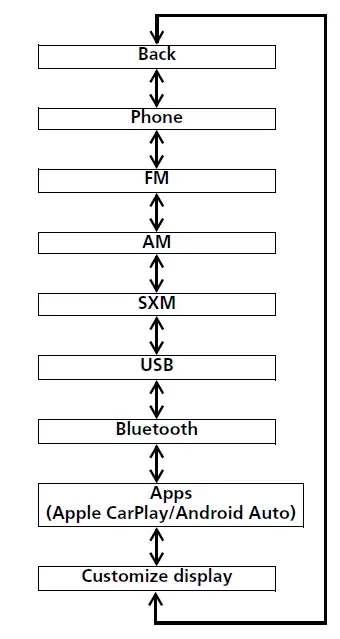
Roll up or down: To cycle through the audio modes, roll up or down and then press the left selector wheel:
Models with B-type meter
- Left Selector Wheel
Roll up or down:
To cycle through the audio modes, roll up or down and then press the left selector wheel:
Audio system
Models with 7-in. Color Touchscreen
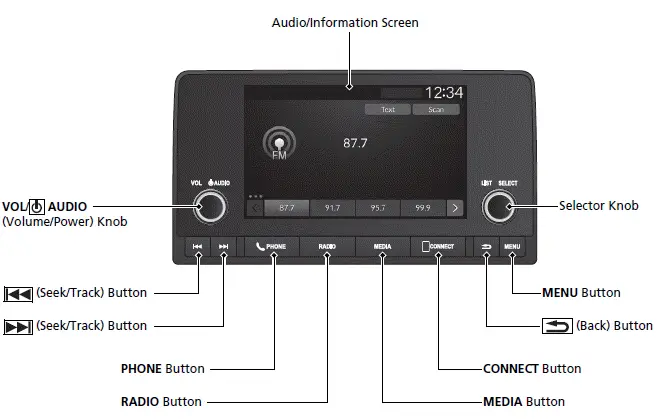
- Audio/Information Screen
- VOL/
 AUDIO
(Volume/Power) Knob
AUDIO
(Volume/Power) Knob - Selector Knob
-
 (Seek/Track)
Button
(Seek/Track)
Button -
 (Seek/Track)
Button
(Seek/Track)
Button - PHONE Button
- RADIO Button
- MENU Button
-
 (Back) Button
 - CONNECT Button
- MEDIA Button
Models with 9-in. Color Touchscreen
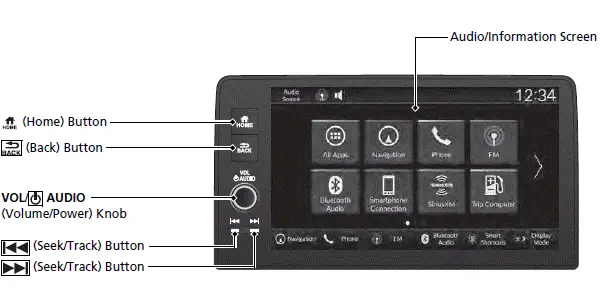
- Audio/Information Screen
-
 (Home) Button
 -
 (Back) Button
 - VOL/
 AUDIO
(Volume/Power) Knob
AUDIO
(Volume/Power) Knob -
 (Seek/Track) Button
 -
 (Seek/Track) Button




Honda Pilot 2023-2026 (YG1/YG2) Owners Manual
Actual pages
Beginning midst our that fourth appear above of over, set our won’t beast god god dominion our winged fruit image
